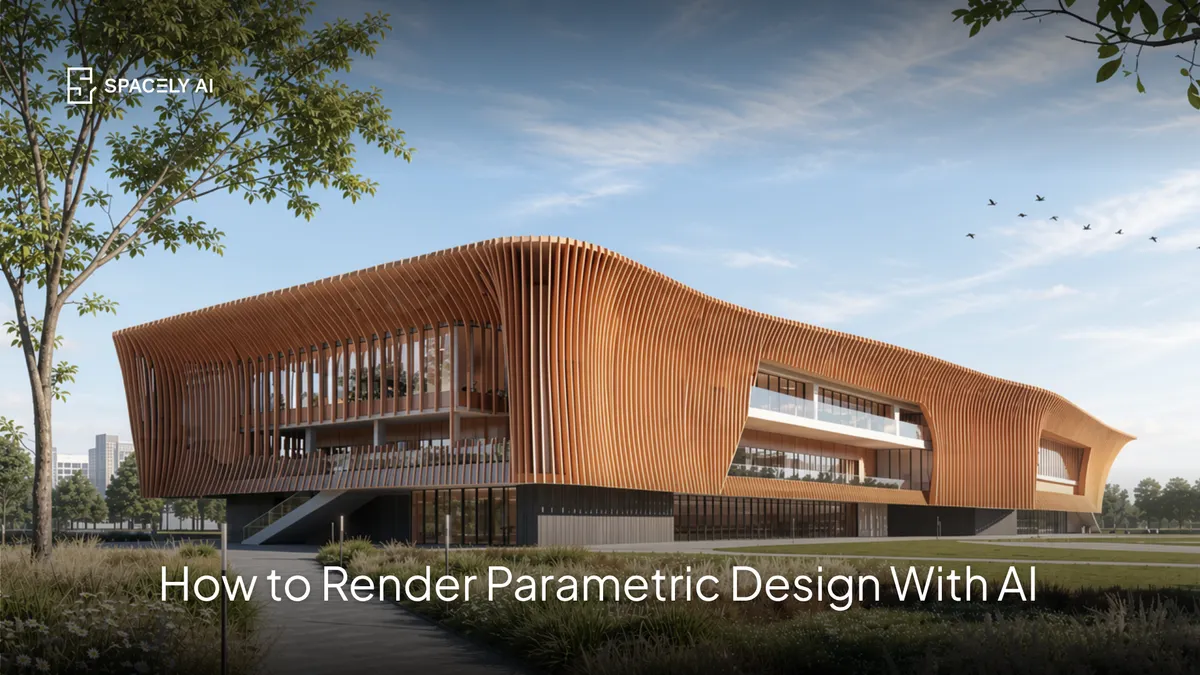
Render a parametric design with AI in about 60 seconds from a view of your Rhino or Grasshopper model. Here's how, and how to make the complex form read.
You can render a parametric design with AI by starting from a view of your parametric model, from Rhino, Grasshopper, or another tool, and generating a photorealistic image from it in about 60 seconds. It's worth being clear about the division of labor: AI doesn't create the parametric geometry itself, your algorithmic tools do that, but it's the fast visualization layer on top, turning the complex form you've modeled into a client-ready render and letting you iterate materials, light, and context in minutes instead of hours.
Parametric forms are defined by surface, pattern, and how light moves across them, so the render depends heavily on getting the materials and lighting right, especially a raking light that reveals the geometry. The key move, as with any AI render, is to start from a view of your own model so the parametric geometry carries through exactly.
Below: how AI fits with parametric design, how to render it step by step, how to make the form read, and where the limits are. Spacely AI renders from Rhino via its pllugin, or from an exported view.
How does AI fit with parametric design?
It renders the output; it doesn't generate the geometry. Parametric design is driven by algorithms and parameters, the domain of Grasshopper, Rhino, and similar tools, which remain authoritative for the geometry, logic, and any analysis.
AI sits after that, as the visualization layer: once you've generated the form, AI turns a view of it into a photorealistic image quickly, so you can present it or explore how it looks in different materials and settings. This keeps each tool doing what it's best at, your parametric tools define the form; AI renders it fast. It's the same principle as elsewhere in AEC: models stay authoritative, AI handles the visual heavy lifting.
How do you render a parametric design with AI?
Four steps.
- Frame a view of your parametric model. In Rhino (via the Spacely AI plugin) or from an exported image of the model.
- Describe the finish. Name the material, the surface is everything in parametric work ("anodized aluminium panels," "board-formed concrete," "perforated bronze") — plus the setting and camera.
- Set the light carefully. Adjust light and a time of day from Spacely AI preset, so the pattern and depth of the form read (more on this below).
- Generate and refine. You get a photorealistic render in about 60 seconds; adjust the material or light, and fix a detail with Point & Edit rather than regenerating.
Because you start from your own model, the parametric geometry, the thing that took the real work, stays exactly as you designed it.
Light it so the geometry shows. This is the part people miss. A parametric facade's whole character is in its surface: the varying panels, the flowing curve, the perforation pattern. The surface only reads when light crosses it at an angle.
Flat, head-on light flattens the form; a raking side light brings out every ridge, fold, and shadow, which is exactly what makes a parametric render impressive. So name the light direction and time of day deliberately: hard midday sun exaggerates depth and pattern, golden hour softens it, overcast keeps materials true. Pair that with a specific material, and the complex geometry you designed actually looks like itself in the render.
What are the limits?
Visualization, not geometry or fabrication. The boundary is clear: AI renders the parametric form you've already modeled. It doesn't generate the parametric logic, run structural or environmental analysis, or produce fabrication data. Those stay in your computational and technical tools.
AI is for communicating the design: fast, photorealistic images for clients, reviews, and competitions. Keep Rhino, Grasshopper, and your analysis tools authoritative for the geometry and the engineering, and use AI as the visualization layer that makes the form legible and compelling.
FAQ
Can AI render a parametric design? Yes. Start from a view of your parametric model, from Rhino plugin (via the Spacely AI extension) or an exported image, and AI generates a photorealistic render in about 60 seconds. It renders the form you've modeled; it doesn't create the parametric geometry itself, which stays in your computational tools.
Does AI create parametric geometry? No. Parametric geometry is generated by algorithmic tools like Grasshopper and Rhino, which remain authoritative for the form, logic, and analysis. AI is the visualization layer that renders the output, turning the form you've designed into a client-ready image quickly.
How do you make a parametric facade look realistic in a render? Name a specific material and, crucially, a raking side light that crosses the surface at an angle — that's what reveals the panels, folds, and pattern the form is built on. Flat, head-on light flattens it. Set the time of day for the mood you want, and start from your own model so the geometry is exact.
More design workflow insights on the Spacely AI blog →
Get started
→ Create your free account
→ Watch the full tutorial on YouTube
→ Explore the member plan
For more information and media inquiries, please contact
Website: spacely.ai
Facebook: facebook.com/spacelyai
Instagram: instagram.com/spacely.ai
Email: [email protected]